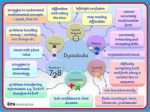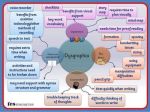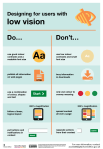
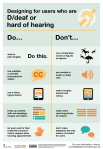
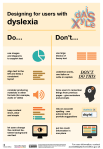
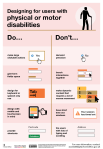
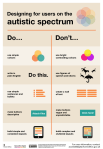
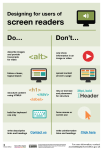
The dos and don’ts of designing for accessibility are general guidelines, best design practices for making services accessible in government. Currently, there are six different posters in the series that cater to users from these areas: low vision, D/deaf and hard of hearing, dyslexia, motor disabilities, users on the autistic spectrum and users of screen readers.
[…] Another aim of the posters is that they’re meant to be general guidance as opposed to being overly prescriptive. Using bright contrast was advised for some (such as those with low vision) although some users on the autistic spectrum would prefer differently. Where advice seems contradictory, it’s always worth testing your designs with users to find the right balance, making compromises that best suit the users’ needs.
I’ve been wanting something like this to reference! Boosting for the others that like to dabble in code/design.
This is some of the most lucidly written accessibility advice I’ve seen. Making accessible web pages should be the default, not an add-on. It’s really not that hard to do, especially when you think about it from the start – and it benefits everyone.
(Obligatory note that there are exceptions to some of these guidelines, e.g., “bunching” some interactions together is an important way to cue which interactions are related to each other, but that’s why these are guidelines, not absolute rules.)
young web designer: thank you oh my god no one has been able to explain this quite as well and this is just good shit
i’ve stopped trash talking comic sans after learning the font is actually one of the only dyslexia-friendly fonts that come standard with most computers and i advocate for others doing the same
In the event that you would like to continue hating Comic Sans, other dyslexia-friendly alternatives include Arial, Verdana, Tahoma, Century Gothic and Trebuchet.
thank
Random fact: Verdana is one of the few fonts which was specifically designed to be as easy to read as possible, even at smaller type sizes. It was designed this way for use on screen, but the same principles apply in print too. This is part of why some Universities use Verdana as their default font for documents.
“In the event that you would like to continue hating Comic Sans” is one of the best things I’ve ever read on this website
Century Gothic and Trebuchet are both quite handsome typefaces.
I’m partial to Century Gothic as well. It’s serif, but not boring.
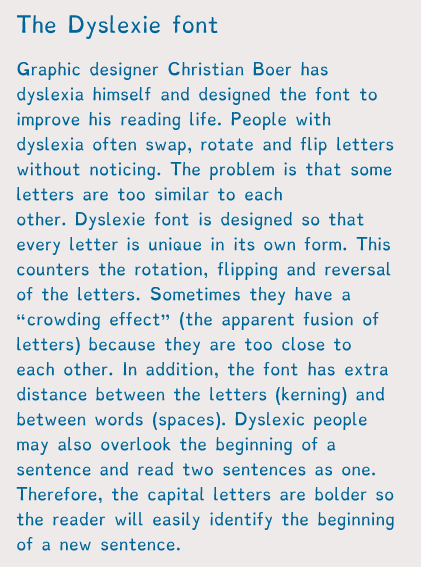
There’s also a dyslexic font designed especially for dyslexic people to read.
You can install on your tablets, laptops and browers etc, so not only can you change things like documents into it, you can change websites into that font as well!
I’m sure you’re bright enough to do a google search, but since I’m dumb enough to forget to post a link, here it is. Better late than never
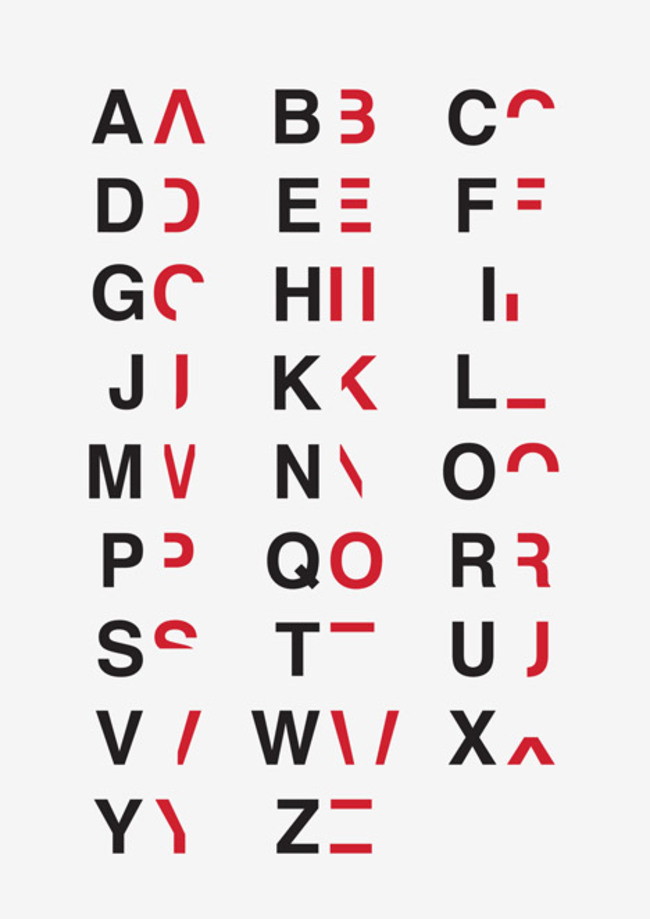
This Dyslexic-Friendly Font Could Help The 1 In 5 People Living With Condition
A few subtle tweaks to a letter’s shape can make a world of difference to some readers.
By creating a new typeface with slight but impactful changes, Dutch designer Christian Boer is making reading an easier task for those, like himself, who live with dyslexia. Letters of the Dyslexie font have heavy base lines, alternating stick and tail lengths and semicursive slants — all modifications that differentiate letters that can look confusingly similar to those with the condition.
Many of you saw this when I originally posted it a few months ago, and it was incredibly popular. However, we have a lot of new people and I thought they might want to see it, as well. Dyslexia is often accompanied by other conditions such as ADHD, dyscalculia, dysgraphia and dyspraxia.